Introduction
Ravencrest Couriers Mod Guide
Birds • Mail • Letters • Alarm Systems • Roleplay Tools
"A kingdom is not held together by stone walls alone. It survives through the messages carried between its people."
Welcome to the complete guide for Ravencrest Couriers, one of the most feature-rich roleplay modifications ever created for Conan Exiles.
While vanilla Conan Exiles provides only a very basic note system, Ravencrest transforms communication into an immersive gameplay mechanic. Instead of relying on external platforms or temporary chat messages, players can create persistent books, sealed scrolls, handwritten letters, functioning courier networks, messenger birds, and public mail systems that exist entirely inside the game world.
Whether you are writing ancient tomes for your library, delivering diplomatic correspondence between kingdoms, maintaining merchant ledgers, documenting archaeological discoveries, or sending anonymous threats to your enemies, Ravencrest gives your stories a physical presence that survives long after the roleplay scene has ended.
✨ What Ravencrest Adds
Ravencrest expands Conan Exiles with an entire communication ecosystem designed specifically for roleplay communities.
| Feature | Purpose |
|---|---|
| 📝 Written Notes | Leave messages anywhere in the world, even inside other player settlements. |
| 📜 Scrolls | Create sealed letters complete with custom wax seals and signatures. |
| 📚 Books | Write fully editable multi-page books containing both text and images. |
| 🦅 Messenger Birds | Deliver physical messages and items between players across the Exiled Lands. |
| 🏠 Bird Coops | Raise, train, and manage your courier birds. |
| 📫 Mailboxes | Receive deliveries securely without granting access to your storage. |
| 🔔 Detection Birds | Transform birds into living alarm systems capable of warning you when players approach. |
| 🧭 Tracking | Use trained birds to detect nearby creatures, birds, or players depending on server settings. |
🎭 Why Use Ravencrest?
One of the greatest strengths of roleplay is persistence.
Discord messages disappear beneath newer conversations. Local chat scrolls away after only a few minutes. Ravencrest changes this by turning information into physical objects that can be carried, hidden, archived, stolen, destroyed, or discovered months later.
A weathered journal hidden beneath a ruined temple tells a story. A sealed scroll delivered by a raven creates anticipation. A merchant's ledger becomes evidence during an investigation. A royal decree displayed inside a throne room reinforces political authority. These small details transform a server from a collection of players into a believable living world.
💡 Roleplay Insight
Think of Ravencrest as more than a mail system. It is a storytelling system. Every document you create has the potential to become part of your world's history.
📖 About This Guide
This guide combines information from the official Ravencrest documentation together with years of community experience and practical roleplay advice.
Rather than simply explaining which buttons to press, this guide focuses on helping you understand how every feature works, when it should be used, and how it can enrich your stories.
✔ Throughout this guide you'll find
- Step-by-step walkthroughs.
- Practical roleplay examples.
- Visual demonstrations.
- Professional recommendations.
- Common mistakes to avoid.
- Advanced techniques.
- Administrator notes where applicable.
📝 Credits
This guide is based on the official Ravencrest Couriers documentation created by the Ravencrest development team, combined with the community tutorial written by darthjimmi & faelynaris then expanded into a comprehensive reference for the Ash & Blood Wiki.
📖 Chapter I — Getting Started
Feats, Recipes & Requirements
Before you can begin writing books, training messenger birds, or establishing a courier network, you'll first need to unlock Ravencrest's dedicated feats. These feats integrate naturally into Conan Exiles' progression system and provide access to every crafting recipe introduced by the mod.
Ravencrest is divided into two primary disciplines:
- Penmanship — Everything related to writing, books, scrolls, notes and mailboxes.
- Bird Keeper — Everything related to messenger birds, bird coops and courier systems.
These two feats are completely independent of one another. A scholar may spend their entire life writing books without ever owning a bird, while a courier may transport messages across the Exiled Lands without ever writing one themselves.
🎓 Unlocking the Feats
Both Ravencrest feats can be learned like any other Conan Exiles feat using Knowledge Points.
Once learned, their recipes immediately become available at the appropriate crafting stations.

✒ Penmanship 
Penmanship is the foundation of Ravencrest's writing system.
Rather than relying on Conan Exiles' limited vanilla notes, Penmanship introduces an entirely new collection of documents that preserve their contents permanently, allowing players to create everything from simple reminders to fully illustrated books.
ℹ Unlocks
- 📝 Written Notes
- 🎭 Anonymous Notes
- 📜 Scrolls
- 📚 Multi-page Books
- 🖋 Inkpots
- ✒ Quills
- 📚 Bookcases
- 📫 Mailboxes
These items form the backbone of countless roleplay scenarios.
| Document | Best Used For |
|---|---|
| Written Notes | Short messages, reminders, notices and invitations. |
| Anonymous Notes | Threats, mysteries, anonymous clues and espionage. |
| Scrolls | Official correspondence, sealed letters and contracts. |
| Books | Journals, libraries, lore, religious texts and historical records. |

Penmanship feat and unlocked recipes.
🦅 Bird Keeper 
Bird Keeper unlocks Ravencrest's courier system and transforms birds from simple decorative companions into living tools capable of transporting messages across the Exiled Lands.
Every functioning postal network begins here.
ℹ Unlocks
- 🦅 Messenger Birds
- 🏠 Bird Coops
- 🪺 Bird Nesting
- 📨 Courier Deliveries
- 🔔 Detection Birds
- 🧭 Tracking Birds
Bird Keeper is ideal for merchants, diplomats, kingdoms, guilds, military organizations and anyone wishing to communicate without relying on global chat or Discord.

Bird Keeper feat and available bird recipes.
🏺 Crafting Stations
Unlike many mods that place everything inside a single workstation, Ravencrest integrates naturally into Conan Exiles by distributing recipes across existing crafting stations.
| Crafting Station | Produces |
|---|---|
| Inventory | Notes and basic writing items. |
| Blacksmith Bench | Bird Coops and Mailboxes. |
| Artisan Bench | Papyrus Scrolls and advanced paper products. |

✔ Best Practice
If your settlement intends to use Ravencrest extensively, consider constructing a dedicated Scriptorium or Library where books, scrolls, writing supplies and mailboxes are kept together. Not only does this improve immersion, but it also gives visitors a clear place to read public documents and leave correspondence.
⚠ Common Mistakes
- Learning Bird Keeper but forgetting Penmanship.
- Looking for Bird Coop recipes inside the wrong crafting station.
- Attempting to send letters before creating any written documents.
- Overlooking Papyrus Scroll recipes at the Artisan Bench.
➡ Next Chapter
Reading & Writing
Learn how to create persistent notes, sealed scrolls, beautifully illustrated books and immersive written correspondence.
📝 Chapter II — Reading & Writing
Documents, Books, Scrolls & Persistent Storytelling
The written word has shaped kingdoms long before swords ever could. A forgotten journal can reveal an ancient secret. A sealed letter can ignite a war. A merchant's ledger can expose corruption. A simple note left upon a doorstep can begin an entirely new story. Ravencrest transforms written communication from temporary chat messages into persistent objects that exist physically inside the game world.
Unlike the vanilla Conan Exiles note system, Ravencrest documents preserve everything you write. Documents may be carried, stored, mailed, displayed, archived, copied and collected without ever losing their contents.
📖 Understanding Ravencrest Documents
Ravencrest introduces three primary document types. Although they all allow you to write text, each serves a different purpose.
| Document | Length | Images | Best Used For |
|---|---|---|---|
| 📝 Note | Short | ✔ | Messages, invitations, clues, reminders. |
| 📜 Scroll | Short | ✔ | Official correspondence, contracts and sealed documents. |
| 📚 Book | Unlimited Pages | ✔ | Lore, journals, libraries, stories and research. |
🖋 Opening a Document
Every Ravencrest document behaves the same way. Simply place the item inside your shortcut bar and use it.

ℹ Documents behave differently depending on their contents.
- If the document is empty, the editor opens allowing you to write.
- If the document already contains text, it opens in reading mode.
- Books can later be edited even after being completed.
📝 Written Notes
Written Notes are Ravencrest's simplest document. Think of them as small pieces of parchment intended for short messages rather than lengthy stories.
Because they are inexpensive and quick to create, notes become one of the most frequently used roleplay tools on a populated server.

Good Uses for Notes
- Welcome messages.
- Merchant advertisements.
- Quest hooks.
- Wanted posters.
- Meeting invitations.
- Warnings.
- Treasure clues.
- Simple journals.
✔ Roleplay Tip
Leave physical notes throughout the world rather than sending Discord messages. Finding a mysterious letter hidden beneath a tavern table creates far more immersion than receiving a notification.
🎭 Anonymous Notes
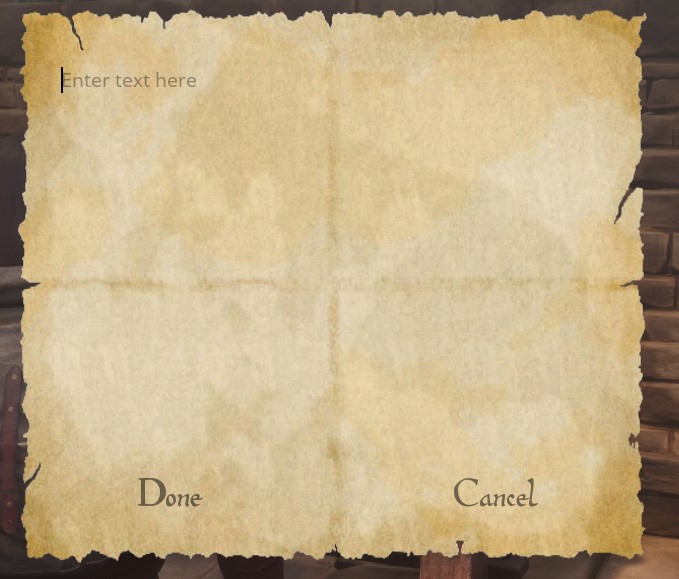
Sometimes the author should remain unknown. Anonymous Notes function almost identically to ordinary notes, except they conceal the identity of whoever wrote them.
These are perfect for intrigue-heavy roleplay.
- Blackmail.
- Threats.
- Political conspiracies.
- Hidden clues.
- Murder mysteries.
- Cult recruitment.
- Secret admirers.
⚠ Best Practice
Anonymous Notes hide your identity in-character. They should never be used to bypass server rules or facilitate out-of-character harassment.
📜 Scrolls
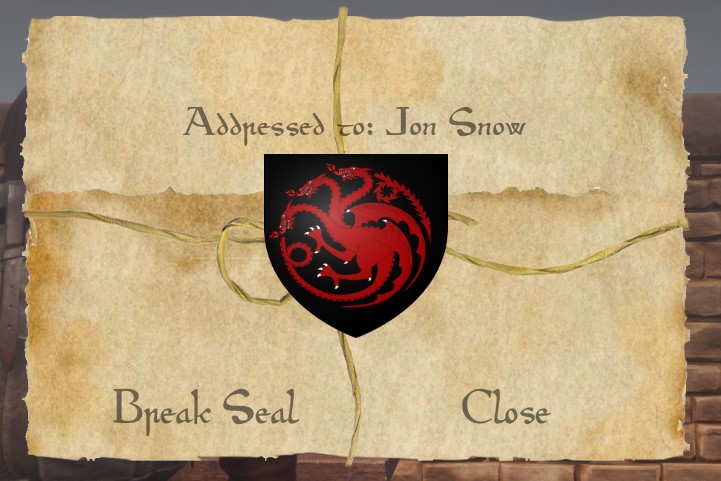
Scrolls occupy the middle ground between Notes and Books. Like notes, they contain a limited amount of information. Unlike notes, scrolls may be sealed, signed and protected until opened by the recipient.

Wax Seals
One of Ravencrest's signature features is the ability to seal a scroll. Until the recipient deliberately breaks the seal, its contents remain hidden.
You may seal documents using:
- Your character's name.
- A custom seal image.
📚 Books
Books are Ravencrest's most powerful writing system. Unlike Notes and Scrolls, books support an unlimited number of pages, allowing entire novels, religious scriptures, historical archives or research journals to be created entirely in-game.
Each book stores:
- Title
- Author
- Unlimited Pages
- Text
- Embedded Images
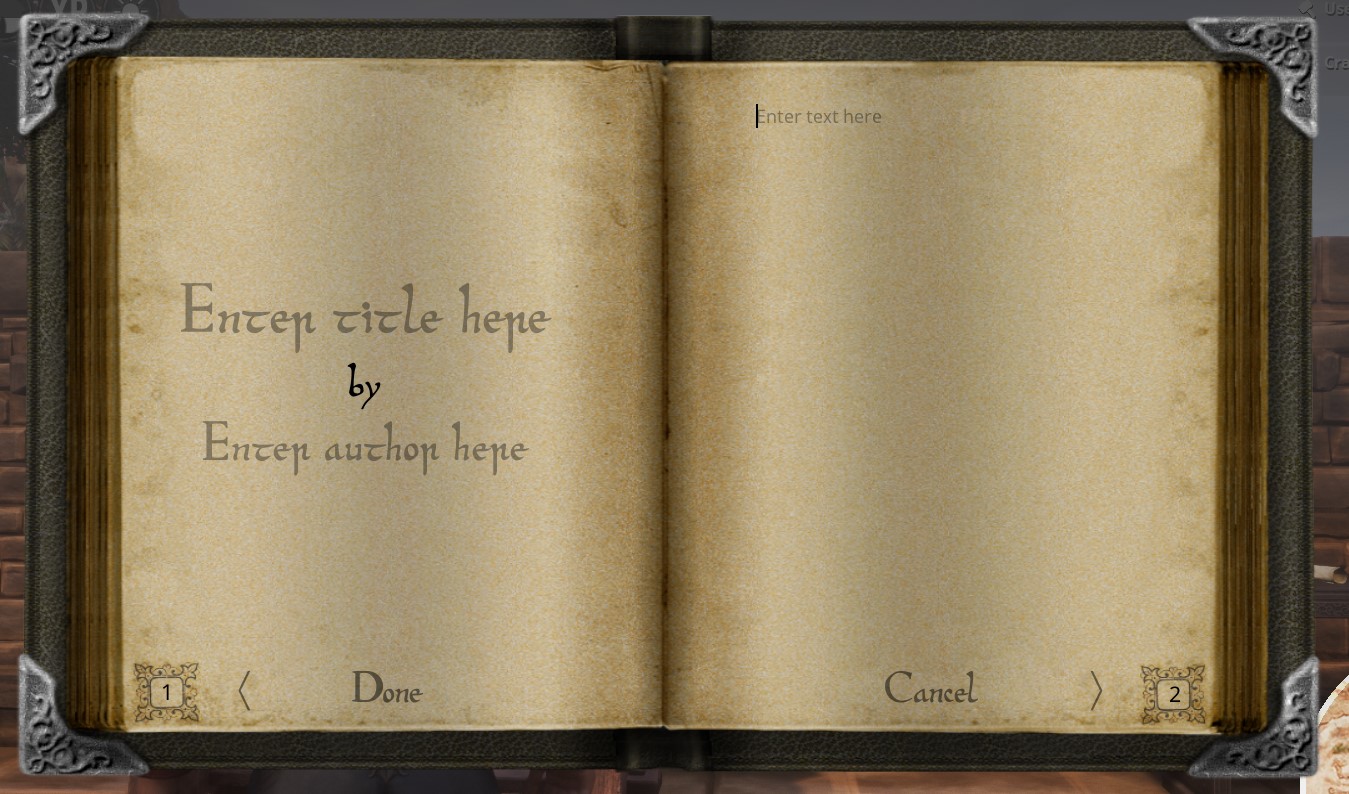
Navigate between pages using the < and > buttons. Books may also be edited after they have already been written, making them ideal for journals or ongoing chronicles.
🖼 Embedding Images
Every Ravencrest document supports externally hosted images. Simply paste the direct URL to an image inside your document.
https://i.imgur.com/example.png
When the document is viewed, Ravencrest automatically downloads and displays the image inline.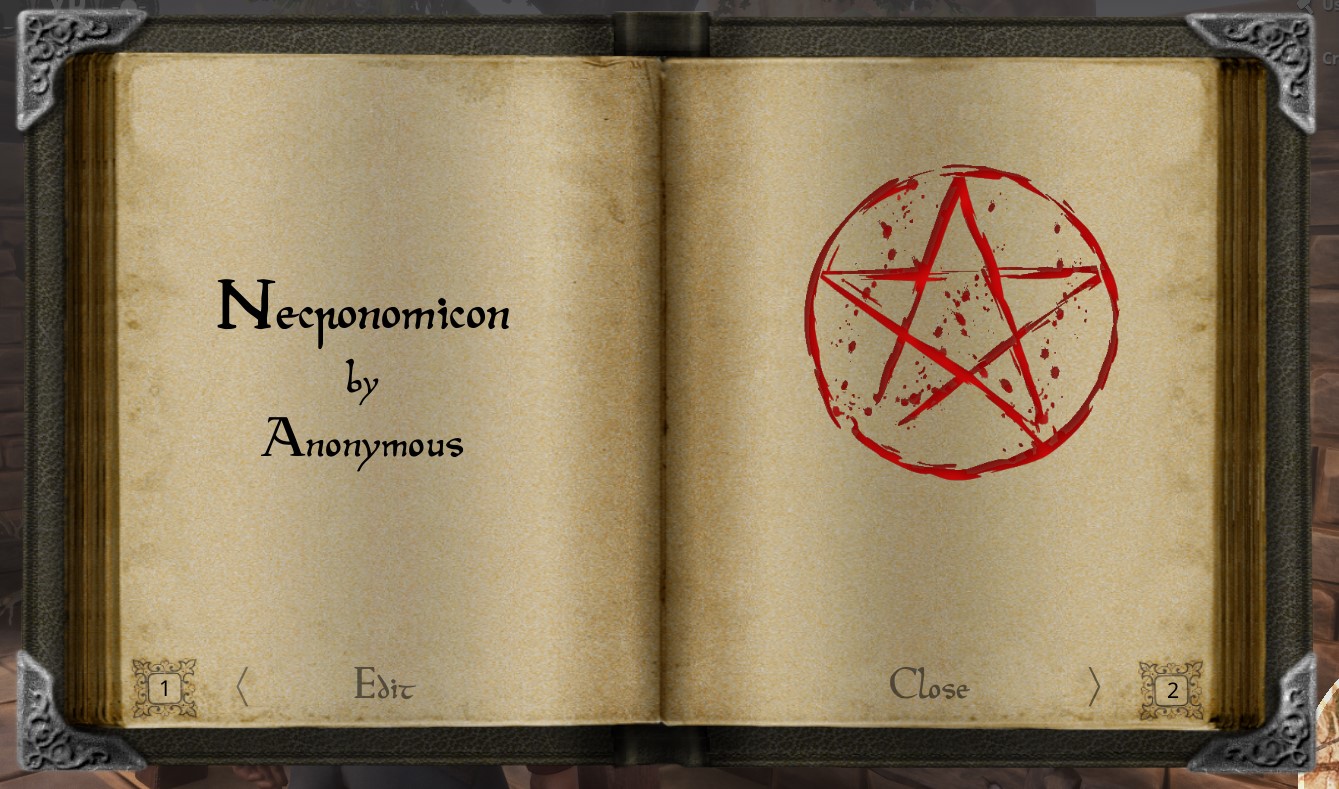
ℹ Supported Uses
- Maps
- Family Crests
- Religious Symbols
- Illustrations
- Diagrams
- Wanted Posters
- Paintings
⚠ Image Hosting
Images must be hosted somewhere publicly accessible. If the image is deleted or the hosting service becomes unavailable, the document will no longer display it.
📍 Placing Documents Into the World
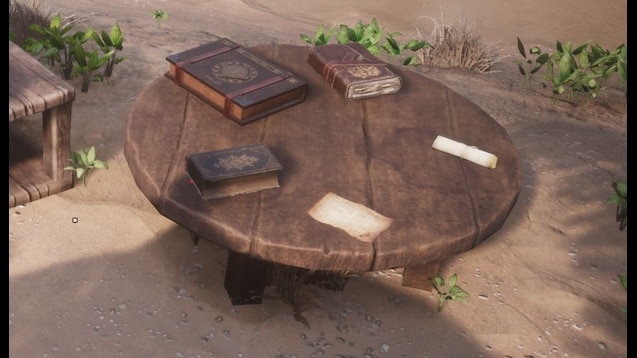
Every document may also exist as a physical object. Instead of opening the document normally, simply double-click the hotbar slot to place it into the world.
This allows players to create:
- Libraries
- Notice Boards
- Archives
- Shrines
- Treasure Hunts
- Quest Chains

✔ Best Practice
Think of every document as a permanent artifact. Months later another player may discover your journal inside forgotten ruins, read a decades-old treaty inside a library, or uncover evidence hidden beneath the floorboards of an abandoned castle. That persistence is what makes Ravencrest such a powerful storytelling tool.
➡ Next Chapter
Bird Coops & Courier Networks
🕊 Chapter III — Bird Coops & Courier Networks
Building the Heart of Your Messenger Network
Every kingdom has roads. Every city has gates. Every army has scouts. Ravencrest's courier network begins with something far simpler: a Bird Coop.
A Bird Coop is much more than a decorative object. It acts as the central hub of your entire postal system, allowing messenger birds to nest, depart on deliveries, return home, gain experience, and receive new assignments.
🏗 Crafting Your First Bird Coop
After learning the Bird Keeper feat, Bird Coops become available inside the Blacksmith Bench.

Several coop variants exist throughout the mod. While their appearance differs, they all perform the same fundamental role. Some larger bird species, such as Eagles, require larger coops and cannot nest inside the smallest versions.
ℹ Choosing the Right Coop
If you intend to use larger bird species later, consider constructing a larger coop from the beginning. This avoids having to relocate your courier network as it grows.
🏠 Placing Your Coop
Once crafted, place the coop just as you would any other placeable. Although it can technically be placed almost anywhere, its location should make sense within your settlement.
Popular locations include:
- Castle courtyards
- Gatehouses
- Watch towers
- Merchant districts
- Libraries
- Postal offices
- Town squares
- Temple courtyards

✏ Naming Your Bird Coop
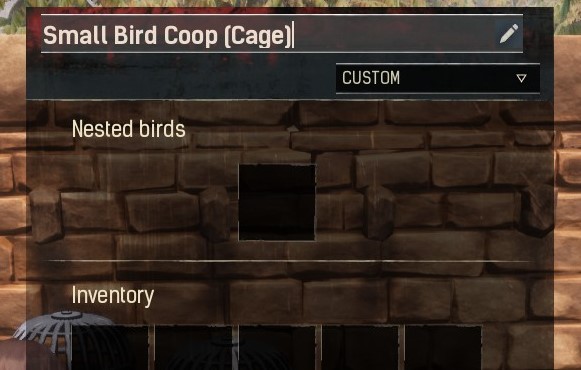
Immediately after placing your coop, you should assign it a name. This is more important than many players realize.
Whenever another player wishes to send you a delivery, they won't search for your character. Instead, they will choose your Bird Coop from a list of destinations.
The destination list displays:
- Your Coop Name
- Your Clan Name
✔ Best Practice
Choose names that identify locations rather than individual players.
| Less Descriptive | Better |
|---|---|
| Bob's Coop | Royal Aviary |
| Mailbox | Temple Messenger Loft |
| Bird House | Northern Watchtower Couriers |
📬 Receiving Mail
The moment your Bird Coop has been named, it becomes available as a destination for every other player on the server.
Whenever a messenger bird successfully completes its journey, you will hear the sound of a bird arriving at your coop.
Your delivered items remain safely stored until you retrieve them.
ℹ Immersion Tip
Instead of immediately opening every delivery, consider retrieving your correspondence during dedicated roleplay scenes. Many kingdoms establish official messenger offices where letters are sorted before being distributed.
🪺 Nesting Messenger Birds
Birds must be nested inside a Bird Coop before they can perform deliveries.
- Place the trained bird inside the coop inventory.
- Select the bird.
- Press Nest.
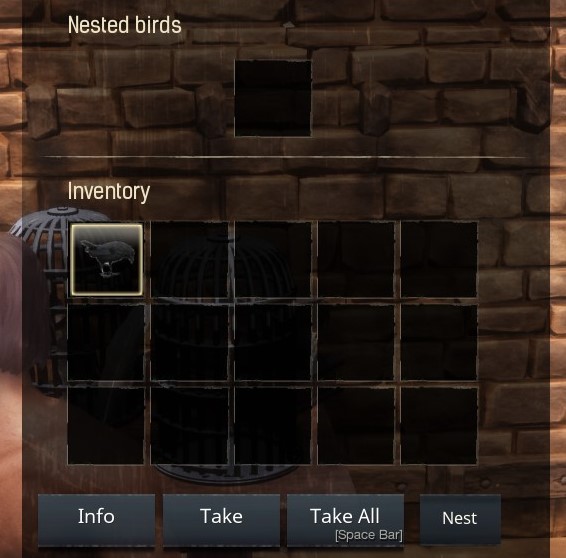
Every coop has a limited number of nesting slots. Large courier stations may therefore require multiple coops depending on the number of active birds.
📦 Understanding the Coop Interface
The Bird Coop interface consists of several independent sections. Understanding each one will make sending mail much easier.
| Section | Purpose |
|---|---|
| Nested Birds | Birds currently assigned to this coop. |
| Bird Slot | The bird selected for the current delivery. |
| Item Slots | Letters and items attached to the delivery. |
| Destination List | Available Bird Coops and Mailboxes. |

⚖ Carry Weight
Messenger birds are living creatures, not magical teleportation devices. Every bird has a maximum carrying capacity.
The heavier the delivery becomes, the slower your bird will travel.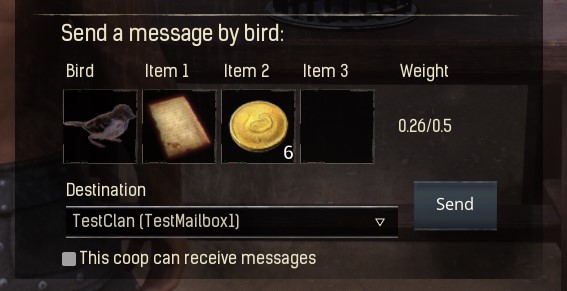
⚠ Important
Birds carrying more than 50% of their maximum weight begin suffering movement penalties. Whenever possible, send several smaller deliveries instead of one overloaded shipment.
📨 Sending Your First Delivery
- Select one of your nested birds.
- Drag it into the Bird Slot.
- Add one or more items to the cargo slots.
- Select a destination.
- Verify the bird's carry weight.
- Press Send.

You'll hear the sound of the bird taking flight as it begins its journey. Once it successfully reaches its destination and returns home, it automatically nests back inside the coop.
✔ Roleplay Ideas
- Create a dedicated Royal Postal Service.
- Build messenger towers along major trade roads.
- Employ courier NPCs or player characters.
- Charge merchants for expedited deliveries.
- Use birds to distribute event invitations.
- Create intelligence networks between allied settlements.
- Establish diplomatic embassies that exchange official correspondence.
⚠ Common Mistakes
- Forgetting to rename your Bird Coop.
- Attempting to send mail without nesting a bird first.
- Overloading birds with unnecessary cargo.
- Using generic coop names that other players cannot identify.
- Ignoring the roleplay potential of a physical postal network.
➡ Next Chapter
Messenger Birds
Learn how birds gain experience, level up, improve their abilities, perch on your shoulder, protect your settlement, and become living companions rather than simple delivery tools.
🦅 Chapter IV — Messenger Birds
Training, Leveling & Mastering Your Feathered Companion
Messenger birds are far more than simple delivery tools. Each bird is a persistent companion that grows alongside its owner, gaining experience, increasing its abilities, and eventually becoming an indispensable member of your settlement. Unlike ordinary placeables, every bird has its own progression, statistics, appearance, and purpose.
🕊 Choosing Your Bird
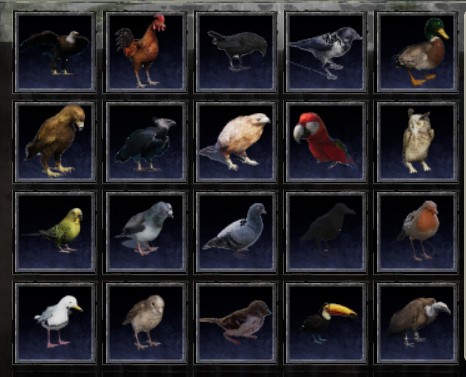
After unlocking the Bird Keeper feat, you'll notice several different bird species available for crafting.
Every species has its own:
- Unique appearance.
- Animations.
- Sound effects.
- Base statistics.
- Physical size.
ℹ Large Bird Species
Some birds, particularly Eagles, require larger Bird Coops. Attempting to place them inside smaller coops simply won't work. Always ensure your coop is capable of housing the species you intend to train.
📖 The Bird Profile
Every messenger bird possesses its own profile. To access it:
- Place the bird inside your shortcut bar.
- Activate the bird.
- The Bird Profile window will appear.
From here you can inspect the bird's statistics, level, available upgrades and interaction options.

⭐ Bird Levels
Messenger birds begin their journey at Level 0, much like Thralls in Conan Exiles. Through regular use they gradually gain experience until eventually reaching the maximum level of 20.
✔ Birds Gain Experience By
- Successfully delivering messages.
- Resting on your shoulder over time.
Every successful delivery rewards experience, encouraging players to actively use their courier network rather than leaving birds idle.
📈 Spending Level Points
Each time your bird gains a level, it earns a single attribute point that may be invested into one of three different statistics. Choosing how to distribute these points determines the bird's specialization.
| Attribute | Effect | Best For |
|---|---|---|
| Travel Speed | Reduces delivery time. | Courier services and busy settlements. |
| Carry Weight | Allows heavier deliveries. | Merchants and logistics. |
| Detection Range | Improves Detection & Tracking. | Guards and scouts. |
⚡ Travel Speed
Travel Speed determines how quickly a bird completes deliveries. Faster birds spend less time in transit, allowing them to carry messages more frequently.
💡 Recommended For
- Large kingdoms.
- Merchant guilds.
- Postal services.
- Diplomatic settlements.
🎒 Carry Weight
Every messenger bird has a carrying capacity. Increasing this attribute allows the bird to transport heavier cargo without suffering movement penalties.
This becomes particularly valuable if your settlement regularly exchanges equipment, supplies or multiple written documents.
👁 Detection Range
Detection Range serves two completely different purposes.
- Detection Mode while birds are placed inside your settlement.
- Tracking Mode while birds are equipped on your shoulder.
Increasing Detection Range makes birds more aware of nearby activity, allowing them to detect targets from greater distances.
✔ Ideal For
- Watch Towers.
- Castle Walls.
- Guard Posts.
- Border Outposts.
- Scouting Parties.
🪶 Shoulder Companion
Messenger birds aren't limited to coops. They may accompany you on your adventures by perching directly upon your shoulder.
- Open the Bird Profile.
- Select Equip.
- Your bird will perch on your shoulder.

While perched, birds continue gaining passive experience over time.
ℹ Passive Training
Simply travelling with your bird equipped contributes to its long-term growth. This allows dedicated roleplayers to naturally level birds simply by participating in everyday adventures.
🪵 Decorative Placement
Birds may also be placed into the world as decorative placeables.
Once placed, they continue to animate naturally, adding life to castles, taverns, temples, docks and marketplaces.
Unlike ordinary decorations, these birds may later be switched into Detection Mode, turning them into functional security systems.

🎭 Roleplay Ideas
- Name important birds individually.
- Assign birds to specific nobles or officers.
- Create military courier divisions.
- Train ceremonial birds for temples.
- Use different bird species to distinguish factions.
- Allow veteran birds to become famous throughout the server.
⚠ Common Mistakes
- Ignoring bird progression entirely.
- Investing every point into a single attribute without considering your needs.
- Using large birds with undersized coops.
- Leaving birds idle instead of allowing them to gain passive experience.
- Thinking birds are disposable instead of long-term companions.
➡ Next Chapter
Detection Mode & Tracking
Transform your messenger birds into living alarm systems capable of protecting settlements, detecting nearby movement and assisting scouts during exploration.
👁 Chapter V — Detection Mode & Tracking
Turning Messenger Birds into Living Alarm Systems
Messenger birds serve purposes far beyond delivering letters. Once properly trained, they become living sentries capable of watching roads, guarding castles, warning of approaching strangers, and assisting travelers during long expeditions. Detection Mode and Tracking are two entirely different systems. Although they share the same Detection Range attribute, they function independently and are designed for completely different situations.
🦜 Detection Mode vs Tracking
Many players confuse these two features. The table below summarizes the difference.
| Feature | Detection Mode | Tracking |
|---|---|---|
| Bird Location | Placed in the world | Perched on your shoulder |
| Main Purpose | Guarding settlements | Exploration & scouting |
| Alert Type | Bird cries when someone approaches | Highlights nearby entities |
| Uses Detection Range | ✔ | ✔ |
🔔 Detection Mode
Detection Mode transforms a decorative bird into a functional lookout. Instead of remaining idle, the bird constantly watches its surroundings and alerts nearby players whenever something enters its detection radius.
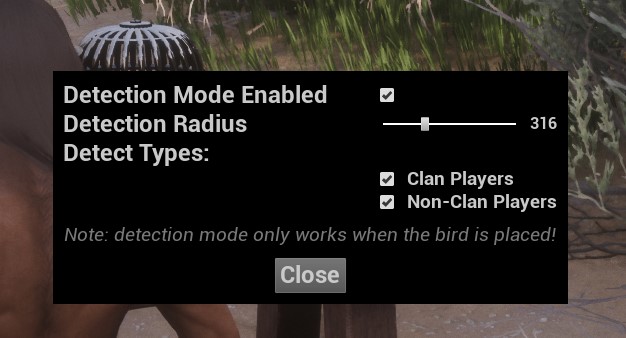
⚙ Enabling Detection Mode
- Place a messenger bird into the world.
- Hold E while looking at the bird.
- Select Configure Detection Mode.
- Adjust the desired settings.
- Enable Detection Mode.
📡 Detection Settings
Each placed bird can be configured independently.
| Setting | Description |
|---|---|
| Detection Enabled | Turns Detection Mode on or off. |
| Detection Radius | Determines how far the bird can detect movement. |
| Detection Types | Determines which players the bird reacts to. |
🏰 Practical Uses
Detection Mode opens countless roleplay possibilities.
- Guard castle entrances.
- Monitor city gates.
- Protect marketplaces.
- Watch treasure vaults.
- Secure diplomatic meeting rooms.
- Guard hidden cave entrances.
- Create warning systems around military camps.
- Monitor temple sanctuaries.
✔ Roleplay Example
Instead of having invisible guards magically know when someone approaches your castle, place ravens along the walls. When one cries out, nearby guards may naturally investigate the disturbance. This creates believable security while generating spontaneous roleplay.
🧭 Tracking Mode
Tracking Mode functions very differently. Rather than protecting a location, it assists the player carrying the bird.
While your messenger bird rests upon your shoulder, it continuously searches the surrounding area for nearby entities.
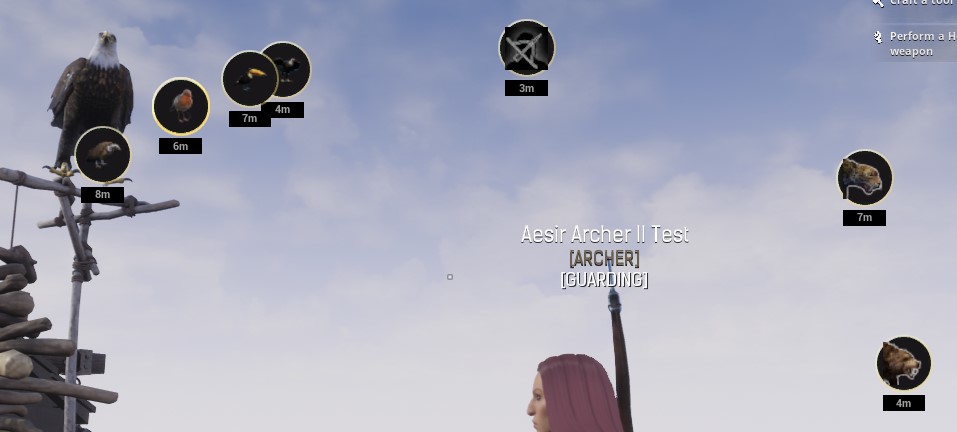
🎒 Enabling Tracking
- Equip your messenger bird.
- Open its Bird Profile.
- Select Toggle Tracking.
- Begin exploring.
Tracking remains active until manually disabled.
🔍 What Can Birds Track?
Exactly what your bird detects depends on the server's configuration.
| Entity | Default | Requires Admin |
|---|---|---|
| Other Messenger Birds | ✔ | No |
| NPCs & Animals | ✖ | Yes |
| Players | ✖ | Yes |
📈 Detection Range
Both Detection Mode and Tracking depend upon the bird's Detection Range attribute. Higher Detection Range means:
- Earlier warnings.
- Greater scouting capability.
- Improved perimeter security.
- Better exploration.
Investing attribute points into Detection Range is highly recommended for guards, scouts, bounty hunters and explorers.
⚙ Performance
ℹ Good to Know
Tracking calculations are performed entirely on the client. This means enabling Tracking does not increase server load or negatively impact server performance.
🎭 Roleplay Ideas
- Create border watchtowers using Detection Birds.
- Assign birds to city guards.
- Use scouts carrying trained hawks during military patrols.
- Protect secret cult entrances with hidden ravens.
- Create alarm systems for noble estates.
- Place birds around prisons to detect escape attempts.
- Establish wildlife observation posts for druids or hunters.
⚠ Common Mistakes
- Confusing Detection Mode with Tracking.
- Forgetting that Tracking depends on server settings.
- Ignoring Detection Range when leveling birds.
- Expecting decorative birds to detect players without enabling Detection Mode.
- Assuming Tracking works on every server by default.
➡ Next Chapter
Mailboxes & Postal Services
Learn how to configure secure mailboxes, receive deliveries from other players, organize settlement-wide postal systems, and build a believable communication network for your roleplay community.
📫 Chapter VI — Mailboxes & Postal Services
Secure Deliveries, Public Correspondence & Settlement Postal Networks
Communication is rarely a private affair. Merchants receive orders. Kings receive diplomatic correspondence. Temples receive donations. Guilds collect contracts. Mailboxes allow all of these interactions to happen naturally without requiring both players to be online at the same time. Rather than functioning as ordinary storage containers, Ravencrest Mailboxes create a secure drop-off point where anyone may deliver items, while only the owner can retrieve them.
📦 What Makes Mailboxes Different?
At first glance, a Ravencrest Mailbox appears similar to an ordinary storage container. In reality, it behaves very differently.
| Ordinary Container | Ravencrest Mailbox |
|---|---|
| Anyone with access may remove items. | Visitors may only deposit items. |
| Functions as storage. | Functions as a delivery system. |
| No courier integration. | Compatible with Messenger Birds. |
| No roleplay mechanics. | Perfect for correspondence, trade and diplomacy. |
🔨 Crafting a Mailbox
Mailboxes become available after learning the Penmanship feat. They are crafted at the Blacksmith Bench alongside Bird Coops.

🏠 Choosing the Right Location
Think carefully before placing your mailbox. Unlike ordinary storage, a mailbox is designed to be accessed by visitors. Choose a location that is both logical and easy to reach.
- Outside your front gate.
- Near your market stalls.
- Beside a town square.
- Inside a public post office.
- At your embassy.
- Outside a guild headquarters.
- Near your settlement entrance.
🔒 Locking Your Mailbox
Immediately after placing your mailbox, lock it. This cannot be overstated.
⚠ Critical
An unlocked mailbox behaves exactly like a normal container. Anyone will be able to remove every item stored inside. Always lock your mailbox before using it.
✏ Naming Your Mailbox
Just like Bird Coops, Mailboxes should be given descriptive names. These names help players identify where they are sending correspondence.
| Avoid | Recommended |
|---|---|
| Mailbox | Royal Correspondence Office |
| My Box | Merchant Guild Depository |
| Letters | Temple Donation Box |
🕊 Receiving Bird Deliveries
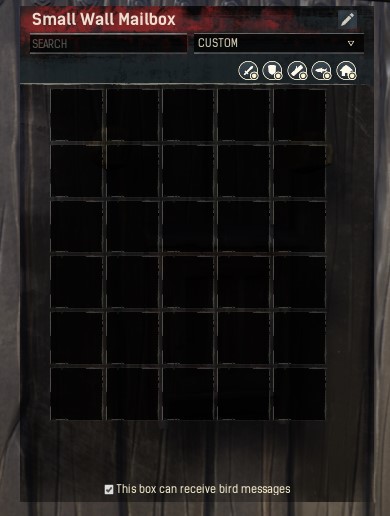
Mailboxes can receive deliveries directly from Messenger Birds. When enabled, players may send documents and items without ever physically visiting your settlement.
If you wish to disable this functionality, simply uncheck the option:
"This box can receive bird messages."
📥 Depositing Items
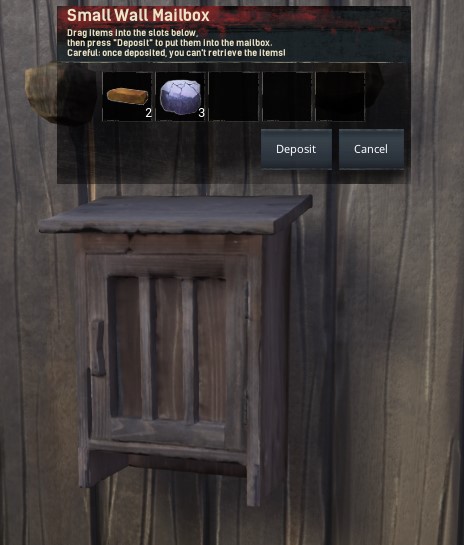
Using a mailbox is intentionally simple.
- Interact with the mailbox.
- Drag up to five items into the deposit slots.
- Review your delivery.
- Press Deposit.
The deposited items immediately become available to the mailbox owner. Visitors cannot retrieve them after depositing.
📚 Practical Uses
Mailboxes support far more than ordinary letters. Almost any small delivery can become part of your roleplay.
| Use | Example |
|---|---|
| Contracts | Mercenary agreements. |
| Trade | Purchase orders and payments. |
| Religion | Temple offerings and donations. |
| Politics | Royal decrees and diplomatic correspondence. |
| Crime | Anonymous blackmail or ransom demands. |
| Events | Festival invitations and tournament registrations. |
🏛 Building a Postal Service
Nothing prevents an entire settlement from operating its own postal service. Large roleplay communities can create dedicated post offices staffed by player couriers.
A fully developed postal service might include:
- Public Mailboxes throughout the city.
- A central sorting office.
- Dedicated Messenger Birds.
- Player-employed postmasters.
- Courier uniforms.
- Official wax seals.
- Delivery fees.
- Government correspondence.
✔ Ash & Blood Spotlight
Imagine arriving at a bustling capital where every district has its own mailbox. Citizens leave taxes at the treasury. Merchants submit purchase orders to the marketplace. Guilds exchange contracts through courier birds. Visitors receive invitations to noble banquets without a single Discord message being sent. That is the type of immersive world Ravencrest makes possible.
📏 Mailbox Capacity
Mailboxes have a finite amount of storage. Once full, additional deposits cannot be accepted until space has been cleared. Owners should empty their mailboxes regularly, especially in busy settlements where deliveries are frequent.
⚠ Common Mistakes
- Leaving the mailbox unlocked.
- Giving the mailbox a generic name.
- Placing it somewhere inaccessible.
- Allowing the mailbox to become full.
- Using Discord instead of in-game correspondence.
➡ Next Chapter
Beyond the Mechanics
Using Ravencrest to tell stories, create roleplay and give birth to new opportunities.
🏛 Chapter VII — Beyond the Mechanics
Using Ravencrest to Tell Better Stories
By now, you've learned how to write documents, train messenger birds, establish courier networks, and receive deliveries through secure mailboxes. Those mechanics are only the beginning. The true strength of Ravencrest has never been its interface or its features. Its true strength lies in the stories those features make possible.
📖 Every Document Has Weight
In most games, information disappears. A conversation ends. Chat scrolls away. Discord messages are buried beneath hundreds of newer ones. Ravencrest changes that. Every note, scroll and book becomes part of your world's history.
A journal abandoned inside forgotten ruins may one day inspire another player's expedition. A treaty signed months ago may suddenly become evidence during a political trial. A simple letter left inside an abandoned house may begin an entirely new storyline years after it was written.
🏛 Build Living Institutions
The greatest roleplay communities rarely revolve around individual characters. Instead, they build institutions that continue existing long after their founders disappear. Ravencrest gives you the tools to do exactly that.
| Institution | Possible Ravencrest Uses |
|---|---|
| Royal Library | Books, historical archives, maps and religious texts. |
| Merchant Guild | Trade ledgers, contracts, invoices and delivery receipts. |
| Temple | Sacred scriptures, confessions, donation boxes and pilgrim journals. |
| Military | Orders, patrol reports, scouting journals and courier dispatches. |
| Noble Houses | Diplomatic correspondence, family records and succession documents. |
| Academies | Research journals, bestiaries and archaeological discoveries. |
🎭 Storytelling Opportunities
Almost every roleplay event can become richer through Ravencrest.
- Leave clues behind after a murder investigation.
- Publish a weekly newspaper covering recent events.
- Maintain an official bounty board.
- Create historical records of wars and political changes.
- Write merchant catalogues with current prices.
- Issue arrest warrants.
- Publish temple sermons.
- Deliver military orders using messenger birds.
- Create treasure maps leading to forgotten ruins.
- Write expedition journals that future explorers may discover.
- Record clan genealogies.
- Maintain diplomatic archives.
- Host book collections inside public libraries.
- Operate a kingdom-wide postal service.
✨ Best Practices
- Write as your character, not as yourself.
- Treat documents as permanent pieces of history.
- Archive important books instead of deleting them.
- Name Bird Coops and Mailboxes consistently.
- Allow discoveries to happen naturally rather than directing players OOC.
- Encourage settlements to establish public libraries.
- Use courier birds instead of Discord whenever practical.
- Leave physical evidence behind after major events.
- Reward players who investigate, read and explore.
- Preserve your server's history through books instead of screenshots.
⚠ Avoid These Habits
- Don't rely on Discord for important roleplay when Ravencrest can accomplish the same thing in-game.
- Don't write books simply to fill shelves. Every document should have purpose.
- Don't overload players with unnecessary paperwork.
- Don't treat courier birds as instant teleportation. Let deliveries build anticipation.
- Don't forget that someone may discover your writing months later.
🌍 Leave Something Behind
One day your character will die. Perhaps they'll fall in battle. Perhaps they'll disappear into the wilderness. Perhaps they'll simply retire. Long after they're gone, their writings may remain. Another exile may one day discover your journal hidden beneath the floorboards of an abandoned inn. A merchant may still quote prices from your ledgers. A priest may continue reading scriptures your character once penned. A kingdom may preserve your letters inside its archives for generations. That is the true power of Ravencrest. It preserves stories.
📘 Final Thoughts
Roleplay is at its strongest when it leaves lasting marks upon the world. Buildings eventually crumble. Characters eventually disappear. Wars eventually end. But the written word survives. Whether you are chronicling forgotten civilizations, maintaining the archives of a great kingdom, or simply leaving a single anonymous note upon a tavern table, every document you create becomes another thread woven into the history of Ash & Blood. Use Ravencrest not simply to exchange messages, but to preserve memories, inspire adventures, and leave a legacy for those who come after you.
Thank You for Reading
May your words travel farther than your sword ever could.