Quick answers to the most common Ash & Blood questions about joining, Heavy RP, characters, clans, PvP, dungeons, injuries, consent, website support and learning to roleplay.
Introduction
ASH & BLOOD
Frequently Asked Questions
Quick answers to the questions players ask most often
This page is the fastest place to start when you are unsure how something works. Answers are intentionally short and practical. Where a subject has a full rulebook or guide, this FAQ gives the important answer and points you toward the correct source instead of repeating the entire article.
01
Start Here
New Player
Start with joining, character creation, Heavy RP and the Roleplayer's Codex.
Conflict
Use the PvP, dungeon, injury and permanent-death questions for quick guidance, then read Rules Book III.
Clans
Use the clan questions for recognition, membership limits and shell-clan rules, then read the Clan Codex and Rules Book IV.
Need Help?
For bugs, account issues or rule disputes, collect screenshots and use the appropriate Discord support or staff channel.
READ THIS
Important
The FAQ is a quick reference. If an FAQ answer and a current rulebook ever appear to differ, the current rulebook takes priority.
What is Ash & Blood?
FAQ 01
What is Ash & Blood?
The short version
Question
What kind of Conan Exiles server is Ash & Blood?
SHORT ANSWER
A Heavy RP, RP-PvP community
Ash & Blood is an 18+ whitelisted, human-only, low-fantasy Conan Exiles UE5 roleplay server. The focus is long-term character stories, consequences, politics, relationships, conflict and a believable Hyborian world rather than mechanical progression alone.
01
What to Expect
›
Heavy text roleplay. Character interaction and writing are central to the experience.
›
RP-PvP. Conflict exists, but mechanical fighting is part of a larger roleplay system.
›
Human characters. Characters belong to the human cultures of the setting rather than fantasy races.
›
Consequences. Injury, reputation, alliances, betrayal and long-term choices are expected to matter.
›
Community storytelling. Your character matters, but so do the stories of everyone around them.
Can I play a non-human or fantasy race?
FAQ 02
Can I Play a Non-Human Character?
Character scope
Question
Can I play an elf, demon, vampire, beast-person or another fantasy race?
ANSWER
No, all player characters are human
Ash & Blood is a human-only, low-fantasy roleplay environment. Supernatural elements may exist in the setting, but they do not turn player characters into unrestricted fantasy races or creatures.
01
What You Can Use Instead
›
Human cultures from the Hyborian setting.
›
Religious beliefs, superstition, fear and folklore.
›
Human characters affected by extraordinary events where the rules and lore allow it.
›
Cultural differences, scars, rituals, professions and personal history to make characters distinct.
Are dungeons aggression-on-sight PvP zones?
FAQ 03
Are Dungeons PvP Zones?
Treasure creates natural conflict
Question
Can players attack each other inside vanilla or modded dungeons?
DUNGEON RULE
Yes, dungeons are aggression-on-sight zones
All vanilla and modded dungeons have a standing IC basis for conflict over treasure, valuable loot, prisoners, escape routes and dungeon objectives. A prior personal feud is not required.
IMPORTANT
/pvp intent is still mandatory
Aggression-on-sight removes the need for prior personal escalation. It does not remove the PvP declaration procedure. Every encounter still begins with /pvp intent before mechanical attack.
My animations / legs are broken
FAQ 03 · ANIMATIONS
My Leg Animations Are Broken
Fixing incorrect leg positioning or movement
Question
Why do my character's legs look broken or animate incorrectly?
Short Answer
Disable your character's Legs IK option.
Certain animation or character setups can cause the leg IK system to position your character's legs incorrectly. Disabling "Disable Your Legs IK" from the player panel should correct the visual problem.
01
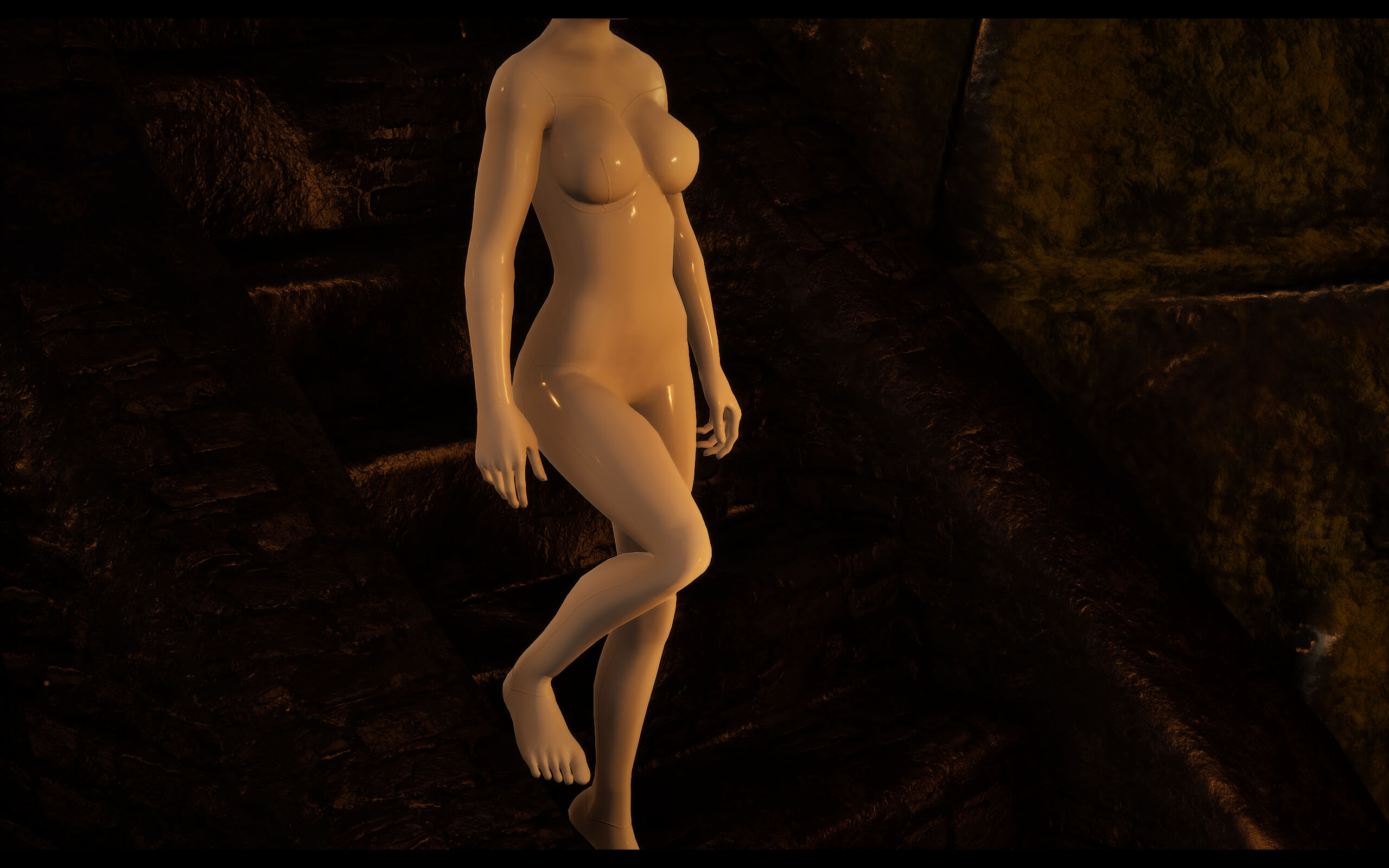
What the Problem Looks Like
Before
Incorrect Leg Positioning
›
The character's legs may bend, stretch or position themselves unnaturally while standing or moving.
After
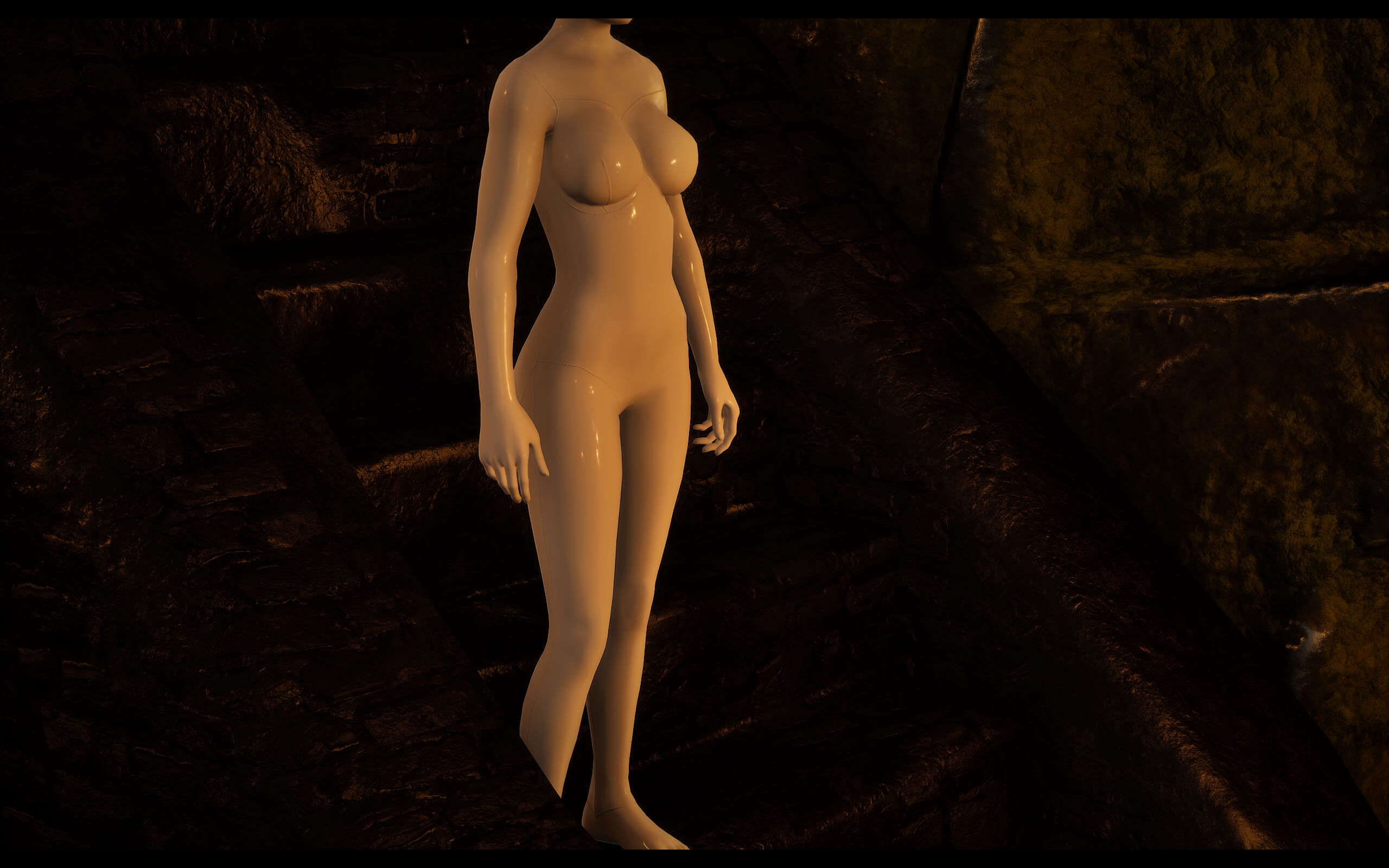
Correct Leg Positioning
›
After disabling the problematic leg IK behavior, the character should return to a natural stance.
02
How to Fix It
STEP 1
Open the Tot! Animations Panel
Press B.
STEP 2
Open the Animation Settings
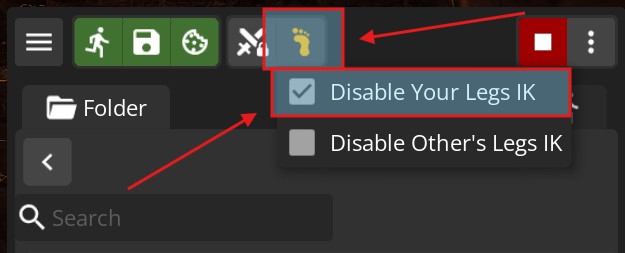
Click the foot icon in the upper-left portion of the panel.
STEP 3
Disable Legs IK
Make sure "Disable Your Legs IK" is checked.
03
Illustrated Fix
Player Panel
Locate "Disable Your Legs IK"
Annotation ›
After pressing B, select the foot icon in the upper-left section of the panel. Find "Disable Your Legs IK" and make sure the checkbox is enabled.
Expected Result
Your character's legs should return to normal
Close the panel and move your character around to confirm the fix. The incorrect leg positioning should no longer be visible.
My Tot!Custom saved armors/accessories are gone!
FAQ 04 · TOT!CUSTOM
My Tot!Custom Saved Armors or Accessories Are Gone
Restoring saved appearance libraries after a recent Tot! update
Question
Why have my saved Tot!Custom armors and accessories disappeared after the update?
Short Answer
Your saved library is usually still there.
After certain Tot!Custom updates, the library search behavior can change and make previously saved armor or accessory entries appear missing. Enabling the correct Sudo Player Panel option should make them visible again.
01
What the Problem Looks Like
Before
Saved Entries Were Fine
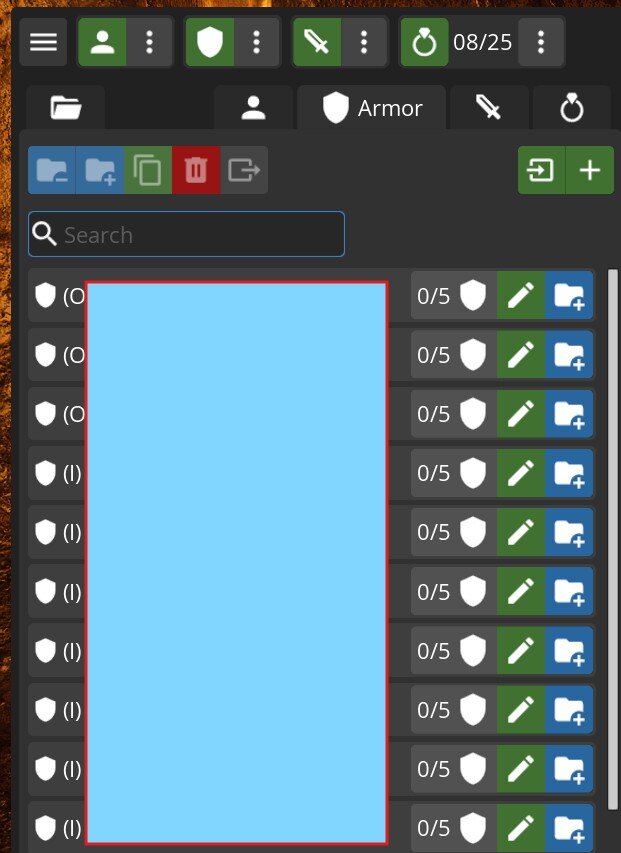
›
Once the correct library-search option is enabled, your previously saved appearances should become visible again.
After
Saved Entries Appear To Be Missing
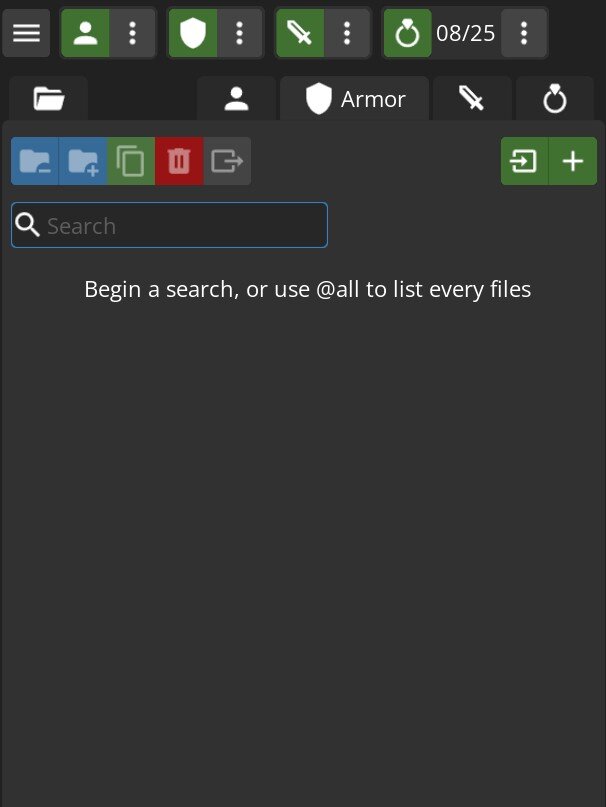
› The saved armor or accessory library may appear empty even though the original entries have not necessarily been deleted.
02
How to Fix It
STEP 1
Open the Conan Exiles Pause Menu
Press Esc while in-game.
STEP 2
Open the Sudo Player Panel
Click Sudo Player Panel in the upper-left area of the menu.
STEP 3
Disable the Library Search Setting
Make sure "Disable Search First Libaries" is checked.
03
Illustrated Steps
STEP 1
Open the Pause Menu
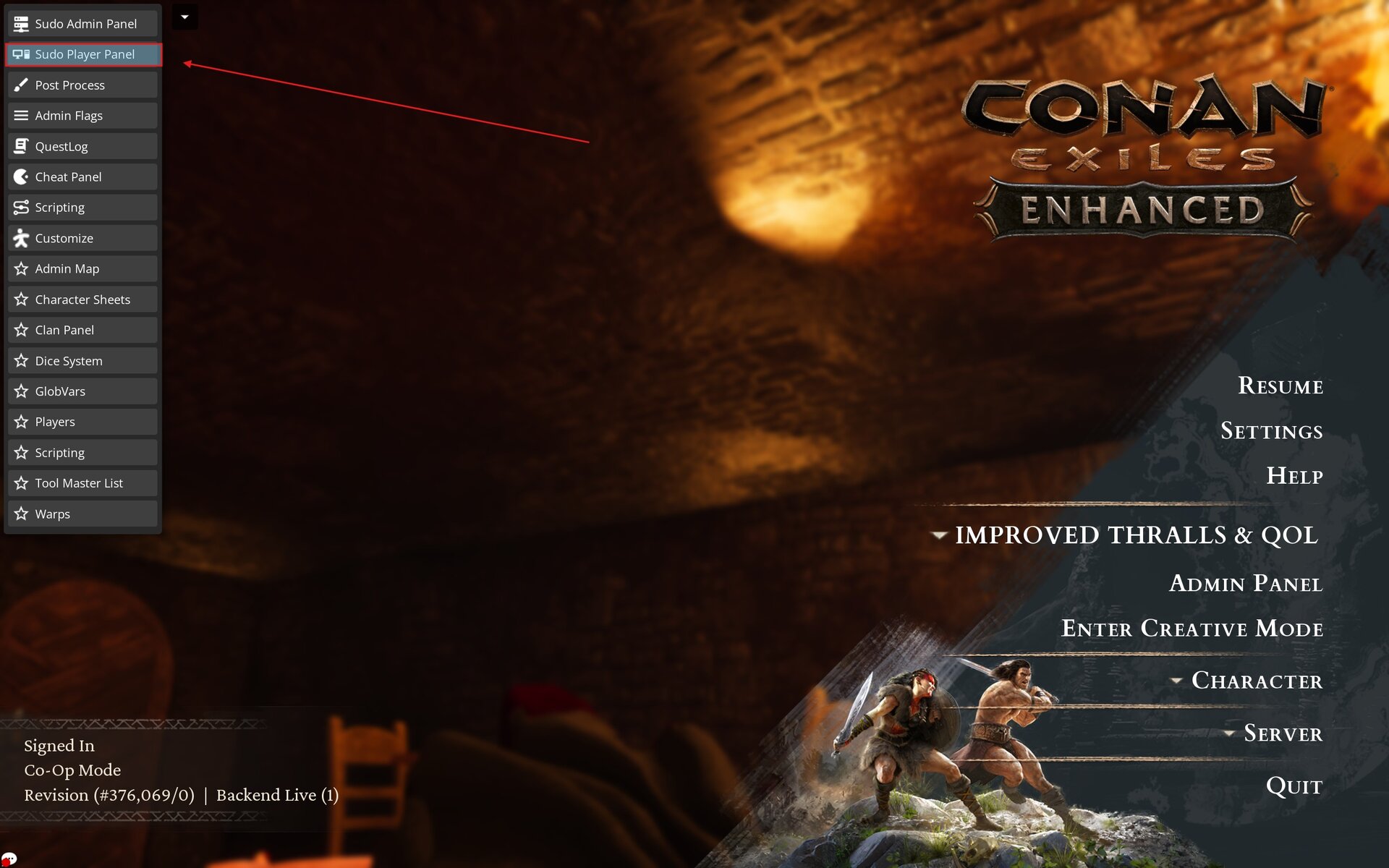
Annotation ›
Press Esc to open this menu. The next option you need is located toward the upper-left.
STEP 2
Open Sudo Player Panel
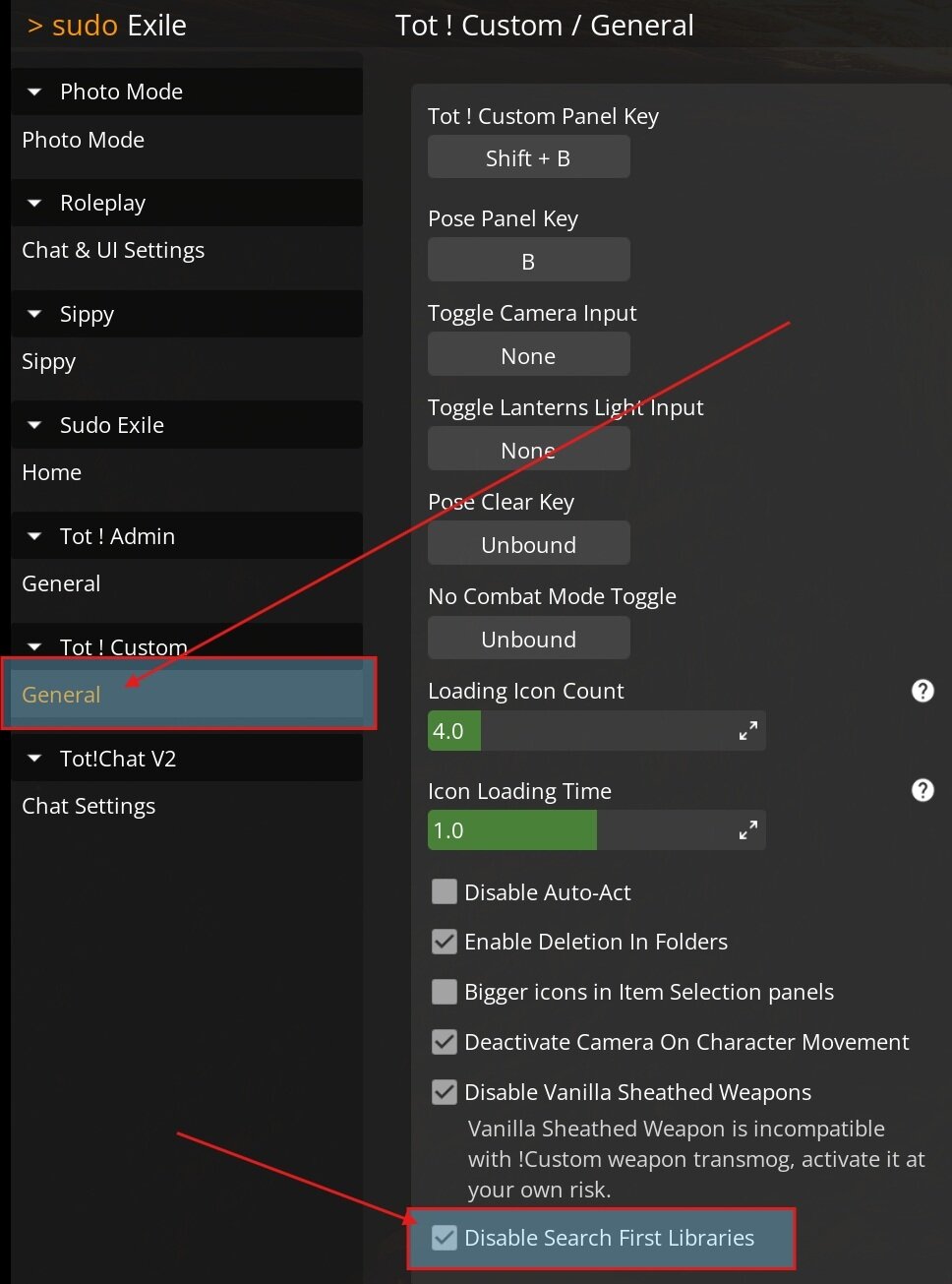
Annotation ›
Select Sudo Player Panel. Inside the panel, enable "Disable Search First Libaries".
Expected Result
Your saved Tot!Custom entries should return
Return to Tot!Custom and check your saved armor and accessory libraries. Your previously saved appearances should now be visible again.